How to Implement Collaborative PLM: Step-by-Step Guide (2026)
Introduction
Product lifecycle management (PLM) has evolved far beyond a simple data repository. As PTC explains, PLM connects teams, data, and systems to streamline development, ensure traceability, improve quality, and drive sustainability. Similarly, monday.com describes PLM as uniting teams, data, and decisions into one powerful workflow from idea to launch. This guide is written for product managers, engineering leads, and operations professionals who want to bridge the gap between siloed collaboration tools and formal PLM processes. By following the steps outlined here, you will learn how to select, configure, and roll out a collaborative platform that integrates with your existing PLM strategy—without requiring a complete overhaul of your current systems.
This guide is designed to be practical and actionable. Expect to spend approximately two to three hours reading the core content, with additional time for guided evaluation of tools and team alignment exercises. Before you begin, you should have a basic understanding of your organization’s product development workflow and access to stakeholders who can provide input on current pain points. No prior PLM software experience is necessary, but familiarity with common collaboration tools (such as Slack, Microsoft Teams, or Notion) will be helpful.
By the end of this guide, you will have a clear roadmap for implementing a collaborative platform that enhances traceability, reduces rework, and accelerates time-to-market. The outcome is a unified environment where your team can manage product data, communicate decisions, and maintain a single source of truth throughout the entire product lifecycle—from initial concept through end-of-life. Pricing for PLM solutions varies widely and changes frequently, so we will focus on capabilities and integration patterns rather than specific cost figures.
Prerequisites
Before implementing a collaborative platform for product lifecycle management, ensure your team has the foundational elements in place. You will need active accounts for your chosen PLM platform—Teamcenter X, for example, offers a 30-day free trial from Siemens, allowing you to evaluate its capabilities risk-free. On the software side, confirm that your organization has compatible operating systems and browsers, as most modern PLM solutions are cloud-based. Team members should possess a working knowledge of product lifecycle management principles, including how PLM connects teams, data, and systems to streamline development and improve quality. Budget considerations are equally important: PLM software pricing varies significantly by vendor, number of users, and feature set, so always check current pricing pages for the most up-to-date figures. Pricing changes frequently, so plan for periodic reviews to align costs with your evolving needs. Finally, designate a project lead or champion who will oversee the implementation and coordinate cross-functional collaboration.
Step 1: Define Your Product Lifecycle Stages and Collaboration Needs
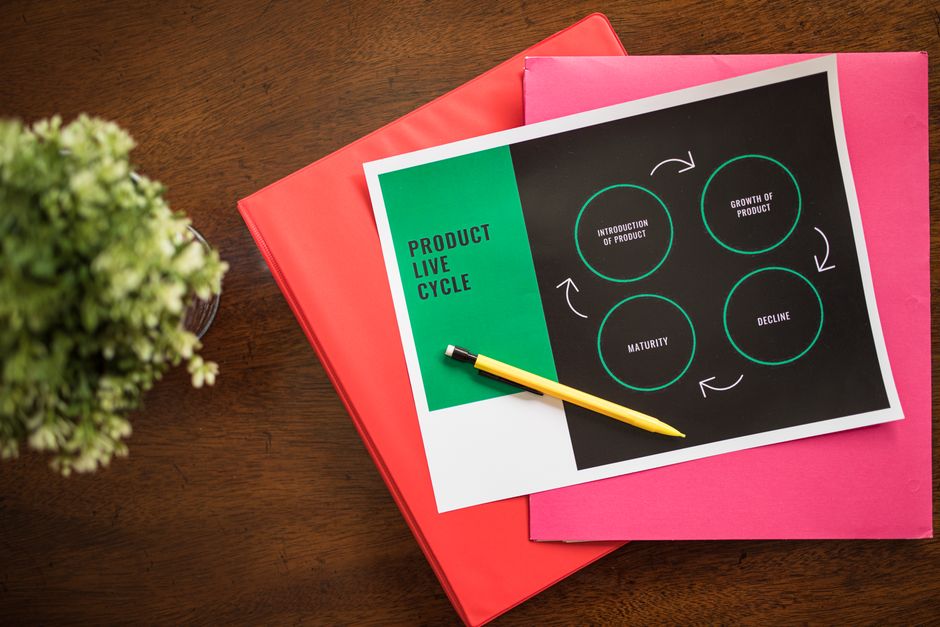
The foundation of any successful collaborative platform and product lifecycle management implementation is a clear map of your product’s journey. According to IBM, the five stages of PLM are concept, design, procurement, production, service, and disposal. But your team likely experiences these phases differently—some stages may involve dozens of external partners, while others are handled internally by a single department. Start by documenting which teams, tools, and data touch each stage. For example, during concept and design, you might rely on engineering and marketing collaboration; during procurement and production, you’ll need suppliers and logistics partners looped in. Identifying these handoffs reveals where your current collaboration breaks down. As monday.com notes, understanding these stages helps you plan resources effectively. You might discover that your disposal and service stages lack any structured collaboration tool, relying instead on scattered emails. By mapping each stage’s communication needs, approval workflows, and document-sharing requirements, you create a blueprint for the collaborative platform that will unify your PLM processes. This step ensures you aren’t just adopting software—you’re solving real coordination bottlenecks.

Step 2: Choose a Collaborative PLM Platform That Fits Your Team
Not all PLM tools are built for real-time teamwork. A collaborative platform and product lifecycle management must work together seamlessly, connecting teams, data, and systems across the entire product journey — from concept to end-of-life. As PTC explains, PLM software serves as the backbone that unifies these elements, making it essential to choose a platform that prioritizes both functionality and collaboration.
Start by evaluating platforms that offer robust version control. When every change is tracked — as monday.com emphasizes with its complete version control capabilities — your team can confidently iterate without losing sight of prior decisions or approvals. This transparency is critical when multiple stakeholders, from engineering to marketing, need to contribute simultaneously.
Look for solutions that allow you to test before committing. Siemens, for instance, offers a Teamcenter X PLM 30-day free software trial, giving your team practical trial experience with enterprise-grade collaboration features without upfront investment. Use this trial period to assess how well the platform integrates with your existing tools, such as CAD software or ERP systems, and whether its communication features — like shared dashboards, task assignments, or real-time commenting — actually reduce friction.
Pricing for collaborative PLM platforms varies widely and changes frequently, so budget discussions should focus on value per user and scalability rather than fixed numbers. Prioritize a platform that aligns with your team size, industry complexity, and collaboration maturity — the right fit will accelerate your product lifecycle, not complicate it.
Step 3: Set Up Your Workspace and Invite Stakeholders
Once your platform selection is complete, the next critical step is structuring your workspace to support cross-domain design management through the integration of tools, data, and processes. Begin by creating a centralized project workspace that mirrors your product’s lifecycle stages—concept, design, development, testing, and launch. Most modern PLM platforms allow you to configure custom workflows, document repositories, and task boards within this space. Organize folders and permission sets according to functional domains: engineering, supply chain, quality, and marketing. This structure ensures that each team sees only the relevant data while maintaining a single source of truth for the entire product record.
Next, define role-based access controls (RBAC) to govern who can view, edit, or approve specific artifacts. Common roles include product manager, design lead, manufacturing engineer, and external partner. Assign each role appropriate permissions early to prevent bottlenecks later. After configuring roles, invite your cross-functional stakeholders via email or single sign-on. Include representatives from every phase of the lifecycle—from industrial design to field service—to ensure end-to-end traceability and collaboration. Send a brief onboarding guide that explains where to find key documents, how to update task statuses, and whom to contact for support. A well-structured workspace with clear roles and invited stakeholders reduces confusion and accelerates your team’s ability to collaborate effectively from day one.
Step 4: Centralize Product Data and Document Management
A collaborative platform and product lifecycle management system are only as effective as the data they govern. In this step, you will establish a single source of truth for all product-related files—CAD models, engineering specifications, BOMs, and compliance documentation. According to Siemens, capturing product data in real time is essential to streamline processes and collaboration, ensuring that every stakeholder works from the same, up-to-date information. Begin by defining a clear folder hierarchy and metadata taxonomy that mirrors your product structure. Then, migrate existing files into the platform, applying consistent naming conventions and tagging each item with relevant attributes such as part number, revision status, and owner. The critical enabler here is complete version control. As monday.com emphasizes, every change must be tracked, meaning each edit, comment, or approval creates a new, immutable version. This eliminates the chaos of multiple file copies and “final_v3” email attachments. Your team can confidently iterate on designs, knowing they can roll back any change and audit the entire history of a document. Finally, configure access permissions to protect sensitive IP while allowing cross-functional visibility. When done right, this centralized repository becomes the operational backbone of your PLM initiative, reducing rework and accelerating time-to-market.
Step 5: Define Workflows and Automate Approvals
A collaborative platform for product lifecycle management truly delivers value when it automates the handoffs that traditionally slow teams down. In a typical PLM rollout, automation comes from encoding review gates, change request workflows, and design-release sequences directly into the platform. Instead of emailing files or chasing down approvers, you configure triggers: when a designer marks a CAD revision “Ready for Review,” the system automatically notifies the engineering lead, collects feedback, and routes the package to the next stakeholder. This approach eliminates constant searching for the latest version, the confusion of tracking multiple file copies, and the missed handoffs that derail release timelines, as observed in monday.com’s analysis of collaborative PLM. Common automated workflows include design review approvals that require sign-off from cross-functional leads, engineering change order (ECO) routing that escalates if a deadline passes, and production handoffs that lock a bill of materials once approved. The key is to map your existing approval matrix — who signs off on what, and in what sequence — then configure the platform to enforce those rules consistently, reducing cycle time and ensuring traceability across every change.

Step 6: Enable Real-Time Collaboration and Communication
A PLM platform is only as effective as the communication it supports. For distributed product teams, collaboration platforms help connect teams across the product lifecycle. PLM software connects teams, data, and systems (PTC), but without real-time communication, even the best-integrated data can lead to misaligned decisions. Enable built-in chat and threaded comments directly on product records, BOMs, and change orders. This keeps context intact and eliminates the need to search through email chains or separate messaging apps. Configure notifications to alert stakeholders when a task is assigned, a document is updated, or a review is due. Set up automated reminders for upcoming deadlines and approval bottlenecks. For cross-functional teams, use activity feeds that show who changed what and why. Encourage team members to tag colleagues in comments to flag dependencies or request input. The goal is to make collaboration frictionless—so that every decision, revision, and approval is traceable and accessible. When communication lives inside the PLM system, you reduce delays, avoid duplication, and keep everyone aligned from concept to retirement.
Step 7: Monitor Progress, Track KPIs, and Iterate
Deploying your collaborative platform and product lifecycle management (PLM) system is not a one-and-done event. PLM is an evolving set of business principles, processes, and supporting information technology systems and tools used in the management of modern products. To keep your platform effective, you must establish a cadence of monitoring, measurement, and iteration. Start by defining key performance indicators (KPIs) that align with your product development goals—such as time-to-market, design revision cycle length, or cross-team response times. Most modern collaborative platforms offer built-in dashboards that surface real-time data on task completion, document approvals, and workflow bottlenecks. Schedule a monthly review where your product team examines these metrics alongside qualitative feedback from users. Identify which processes are still causing friction and which integrations need refinement. For example, if your KPI data shows that engineering handoffs consistently take three days longer than planned, update your platform’s automated notifications or approval rules to tighten the loop. Document every iteration in a changelog visible to all stakeholders. This continuous improvement cycle ensures your collaborative platform evolves with your team’s needs rather than becoming a static repository. Remember that pricing for PLM tools changes frequently, so revisit your subscription tier during these reviews to ensure you are only paying for the capabilities your current workflow demands.
Troubleshooting Common Issues
Even the most thoughtfully designed collaborative platform for product lifecycle management will encounter friction during rollout. Three issues consistently emerge: data silos, resistance to change, and version conflicts. Each undermines the core promise of PLM—connecting teams, data, and systems to streamline development and ensure traceability. When teams fall back on email attachments or local folders, they reintroduce the very chaos that a unified platform is meant to eliminate. This manifests as constant searching for the latest file, confusion over which revision is current, and missed handoffs between engineering, procurement, and production. The solution is to enforce a single source of truth from day one. Configure your platform so that all product data—BOMs, CAD files, specifications, and change requests—lives in one accessible location, with role-based permissions replacing the need for personal copies. Resistance to change often stems from fear of lost autonomy or added complexity. Address this by demonstrating quick wins: show a design engineer how automated notifications replace manual status checks, or illustrate for a procurement lead how real-time BOM updates prevent ordering obsolete parts. Finally, version conflicts resolve cleanly when your platform includes check-in/check-out workflows, automatic revision numbering, and a clear audit trail. These capabilities eliminate the guesswork of which file is final, making every handoff predictable and traceable. Regular training sessions and a dedicated champion within each department can further smooth adoption, turning skeptics into advocates who see the platform not as overhead, but as the backbone of faster, more reliable product delivery.
Pro Tips & Best Practices
Even the most powerful collaborative platform and product lifecycle management tools will fail without disciplined workflows and team-wide habits. Start by establishing standardized naming conventions for files, parts, and revisions. A consistent format—for example, ProjectName_Component_Version_Date—prevents confusion when dozens of team members access the same BOM or CAD model. Next, create reusable templates for common artifacts like design reviews, change requests, and project kickoffs. Templates reduce rework and ensure every phase of the lifecycle captures the same critical information. Schedule recurring cross-functional reviews at key milestones: concept approval, design freeze, and pre-production. These reviews should include stakeholders from engineering, procurement, quality, and marketing to catch issues early and align on priorities. Finally, invest time in metadata tagging and version control discipline. Encourage teams to add descriptive tags (e.g., “prototype,” “production-ready,” “obsolete”) so that searches return relevant results quickly. Regular audits—quarterly or after each major release—help clean up orphaned files, retire outdated versions, and reinforce best practices. When these habits become second nature, your collaborative platform and product lifecycle management environment stays organized, traceable, and ready to scale.
Alternative Methods
Not every product team needs a dedicated, full-suite PLM system from the outset. A lighter-weight alternative is to layer a collaborative platform—such as a modern work hub with document sharing, task tracking, and real-time communication—on top of existing PLM integrations. This approach lets teams adopt a collaborative platform and product lifecycle management strategy incrementally, connecting tools like CAD viewers, BOM spreadsheets, and approval workflows without a heavy upfront commitment. It works well for smaller teams or organizations that prioritize flexibility over centralized governance. On the other end of the spectrum, a full-suite PLM solution provides end-to-end control, from concept through disposal, with built-in traceability, compliance, and change management. As IBM notes, PLM enables teams to manage product lifecycles “from concept and design through procurement and production to service and disposal,” making it ideal for regulated industries or complex supply chains. The trade-off is typically higher cost and longer implementation time. Teams should evaluate their scale, regulatory needs, and collaboration maturity before choosing a path.
Frequently Asked Questions
What is product lifecycle management (PLM)? Product lifecycle management is a systematic approach to managing the entire lifecycle of a product from its initial concept and design through manufacturing, service, and eventual disposal. According to PTC, PLM software connects teams, data, and systems to streamline development, ensure traceability, improve quality, and drive sustainability. IBM similarly defines PLM as enabling developers to manage product lifecycles from concept and design through procurement and production to service and disposal. In practice, PLM serves as a centralized backbone for all product-related information—including specifications, bills of materials, change orders, and compliance documentation—making it essential for complex, regulated industries.
What is the history of PLM? As PTC notes, product lifecycle management emerged in the 1980s as computer-aided design (CAD) systems generated massive amounts of digital product data that needed structured management. Early PLM solutions focused primarily on engineering data management, then expanded over subsequent decades to integrate with enterprise resource planning, supply chain, and quality systems. Modern PLM platforms now incorporate cloud capabilities, real-time collaboration, and digital thread functionality.
How does a collaborative platform improve PLM? A collaborative platform unifies PLM with communication and workflow tools, enabling cross-functional teams—engineering, manufacturing, procurement, and marketing—to work from a single source of truth. This eliminates silos, accelerates decision-making, and reduces errors caused by outdated information. When collaboration is embedded directly into PLM processes, teams can review designs, approve changes, and track issues without switching between disconnected applications.
Conclusion
By now, you have the blueprint to transform how your product team collaborates throughout the entire product lifecycle. You’ve learned how to assess your current workflows, select the right collaborative platform, and integrate it with your existing PLM processes. The result is a unified system that reduces data silos, speeds up decision-making, and improves traceability from concept to end-of-life. The key is to start small, validate with a pilot team, then scale gradually. As a practical next step, shortlist two or three PLM platforms, verify current trials and pricing on vendor pages, and run a small pilot with one cross-functional workflow before committing to a broader rollout.